Distance Calibration
Roversa drives forward for a set amount of time. This program helps you find how many milliseconds it takes to drive exactly one step. Once Roversa knows that, drive forward moves one step every time, and the advanced blocks will work, too.
Step 1 - Set your steer trim first
If your Roversa is not driving straight, go through the Steering Calibration first.
Step 2 - Load the program
Download this code onto your Roversa and line it up at the start of a space on a mat or other surface.
Step 3 - Drive and watch
Press Play button to drive Roversa forward and see where it stops compared to one step.
Step 4 - Adjust the time
- If Roversa stopped before the end of the step, press Forward button to add time.
- If Roversa went past the step, press the Backward button to take time away.
Each press changes the time by 10 ms - you’ll hear a rising sound when it goes up and a falling sound when it goes down.
Step 5 - Test again
Press Play button and repeat Steps 3–4 until Roversa lands exactly one step forward.
Step 6 - Read your number
Press Menu button to show the milliseconds on the LED screen.
Step 7 - Save it
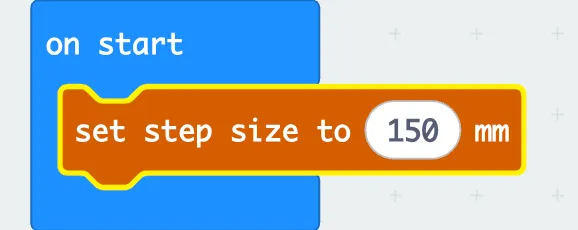
Write the number down. In your own project, put this block inside the on start block and update the step size mm with the number you wrote down.