Turn Time Calibration
Roversa turns by spinning for a set amount of time. This program helps you find how many milliseconds it takes to spin one full circle (360°). Once Roversa knows that, it can turn any angle accurately.
Step 1 - Load the program
Download this code onto your Roversa.
Step 2 - Spin and watch
Put a sticker or mark on the floor lined up with the front of Roversa, so you can see when it has spun back to the start.
- Press Play button to spin Roversa in place, and watch how far it goes.
Step 3 - Adjust the time
- Did Roversa stop before completing a full circle? Press the Right turn arrow button to add time.
- Did Roversa spin more than a full circle? Press the Left turn arrow to take time away.
Each press changes the time by 20 ms - you’ll hear a rising sound when it goes up and a falling sound when it goes down.
Step 4 - Test again
Press Play button and repeat Steps 2–3 until Roversa spins exactly one full circle, ending up pointed the same way it started.
Step 5 - Read your number
Press Menu button to show the milliseconds on the LED screen.
Step 6 - Double-check (optional)
Press Stop button to watch Roversa turn 90°, pause, then turn 180° using your number. If those angles look right, your calibration is good.
Step 7 - Save it
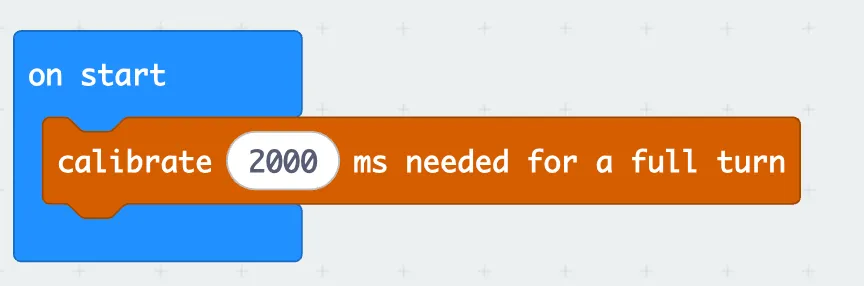
Write the number down. In your own project, put this block inside the on start block and update the calibrate ms with the number you wrote down.